Anker Charging Stations for a Clean Gaming Desk Setup
Every spec and price on this page is quoted from the Amazon listing for that model. Scores are out of 10, based on listed specifications and buyer feedback. Nothing here was handled or measured by us.
As Amazon Associates, we earn from qualifying purchases. This means we may receive a small commission at no extra cost to you if you click through and make a purchase.
The best Anker charging station for a gaming desk is the one that covers your most power-hungry device first. If a laptop or handheld PC sits at the center of your setup, you need a charger that can push high wattage through a single USB-C port while still feeding phones, earbuds and controllers. If your desk is mostly phones and controllers, a compact multi-port hub is enough. Port count keeps cables tidy; wattage decides whether your laptop actually charges while you play.
This comparison covers four Anker chargers: the 250W Prime Charging Station, the 150W Travel Charging Station, the 112W six-port Desktop Charger and a small 20W two-port charger block. They range from a do-everything command center with a screen to a pocket-size spare. We compared the listings and published specs rather than running our own charge tests, and we flag the fine print on per-port limits and missing cables.
JOB SHEET
Which Anker Charging Station Should You Buy
- A crowded desk of phones, earbuds and controllers: Anker Desktop Charger (112W, 6 ports).
go to no. 01 - Laptop, handheld and phone charging at full speed from one hub: Anker Prime Charging Station (250W).
go to no. 02 - A spare for the couch or bedside: Anker Phone Charger (20W, 2 ports).
go to no. 03 - LAN parties, tournaments and travel with a laptop: Anker Travel Charging Station (150W).
go to no. 04
No. 01
of 4
Anker
Anker Desktop Charger

8.4
/10
Our score
Affiliate link. Price and stock live at Amazon and change there, not on this page.
Best for
Desks charging many phones and controllers
Pros
- Six ports, 112W total
- Cable organizer included
- Compact 3.0 x 3.2 inch body
Cons
- 30W max from a single port
- Cables not included
The Anker Desktop Charger packs six ports into a block measuring 3.0 by 3.2 by 1.3 inches: three USB-C and three USB-A, with 112W total output. It weighs 10.65 ounces, so it sits comfortably on a desk without dominating it, and Anker includes a silicone cable organizer to keep the leads in line.
The key detail is the per-port ceiling. A single USB-C port tops out at 30W and a single USB-A port at 18W, and the listing notes the 30W rate is limited to the USB-C1 port. That is plenty for phones, earbuds, controllers and tablets, and Anker says it can bring a lightweight laptop to 50 percent in 1 hour 40 minutes. It will not fast charge a big gaming laptop.
This suits a desk where lots of small devices need a home: two controllers, a headset, a phone and a tablet at once. The mix of USB-A and USB-C is also handy if you still own older controllers or accessories that only take USB-A cables. If your laptop is part of the plan, move up to the Prime or Travel station. USB-C cables are not included, and the warranty is 18 months.
- 3 USB-C and 3 USB-A ports, 112W total
- Up to 30W from one USB-C port, 18W from one USB-A port
- Silicone cable organizer included
No. 02
of 4
Anker
Anker Prime Charging Station

8.2
/10
Our score
Affiliate link. Price and stock live at Amazon and change there, not on this page.
Best for
Power users charging laptops and handhelds together
Pros
- 250W across six ports
- 140W from one USB-C port
- LCD display and control dial
Cons
- Not recommended for travel
- 4 GHz Wi-Fi only for app
The Anker Prime Charging Station is the command center of this lineup. It delivers 250W across four USB-C and two USB-A ports using GaN technology, and the first USB-C port alone can deliver 140W. Anker says that is enough to take a 16-inch laptop to 50 percent in 25 minutes.
It also brings gamer-friendly feedback: a 2.26-inch LCD shows charging status and speed in real time, and a smart control dial lets you adjust how power is allocated between devices. Registering with the Anker app unlocks the connected features, but note that it supports only 2.4 GHz Wi-Fi. It measures 4.18 by 1.58 by 3.64 inches and weighs 22.58 ounces, and Anker says outright that it is designed for the desk and not recommended for travel.
Choose this if your setup includes a gaming laptop or a handheld PC alongside phones and accessories, and you want to see exactly what each port is doing. It carries a 24-month warranty, the longest here. For more on high-wattage single-port options, see our guide to a 100W USB-C charger.
- 250W total across 4 USB-C and 2 USB-A ports
- 140W from the first USB-C port
- 2.26-inch LCD and control dial
- 24-month warranty
No. 03
of 4
Anker
Anker Phone Charger
9.0
/10
Our score
Affiliate link. Price and stock live at Amazon and change there, not on this page.
Best for
A spare phone and controller charger
Pros
- Two ports at once
- Two 5 ft USB-C cables included
- Small and portable
Cons
- 20W max output
- Too weak for laptops
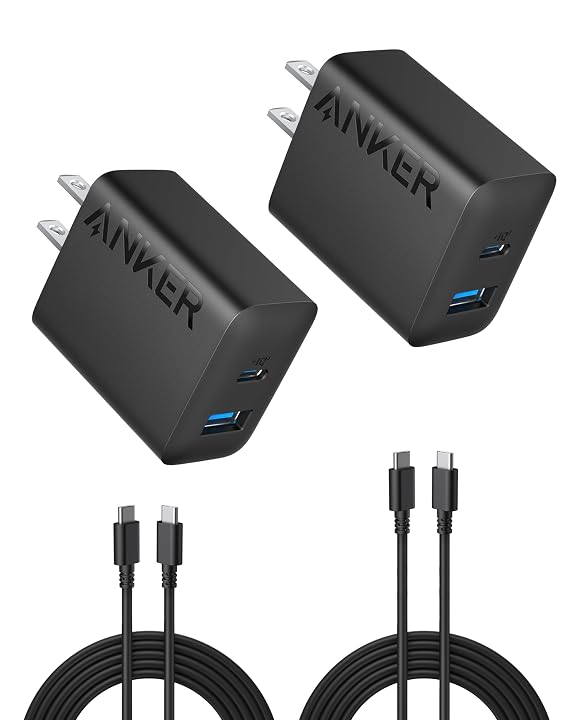
The Anker Phone Charger is the small one: a 20W wall block with one USB-C and one USB-A port that can run at the same time. It is not a charging station in the desk sense, but it is a practical spare for topping up a phone and a controller from the couch or bedside.
What makes it good value is the bundle. It comes with two 5-foot USB-C to USB-C cables, which none of the bigger stations include. Five feet is a useful length for reaching from a wall outlet to a couch or bed. Anker lists overvoltage protection and temperature control among its safety features, and the warranty is 18 months.
At 20W max, it is meant for phones, earbuds and small devices, not laptops. Buy it as a second charger to pair with one of the stations, or as a travel spare. If you want more wall-block options, our roundup of USB-C charger blocks covers the range.
No. 04
of 4
Anker
Anker Travel Charging Station

8.8
/10
Our score
Affiliate link. Price and stock live at Amazon and change there, not on this page.
Best for
LAN parties and travel with a laptop
Pros
- 150W across six ports
- Up to 100W per USB-C port
- Slim 0.87 inch profile
Cons
- Cables not included
- Needs AC power, no battery
The Anker Travel Charging Station is the one to throw in a backpack for LAN parties and tournaments. It offers four USB-C and two USB-A ports with 150W total, and USB-C1 and USB-C2 can each deliver up to 100W when used on their own. PowerIQ 4.0 distributes power based on what each device needs.
It is slim at 5.9 by 2.7 by 0.87 inches and weighs 0.64 pounds, or 0.84 pounds with its power cord. Anker’s ActiveShield 4.0 system monitors temperature continuously and provides 7 layers of protection. The box calls it the Anker Nano Charging Station, and the listing is clear that it needs AC power and is not a power bank, wireless charger or USB hub. Charging cables are not included. Some spec lines on the listing, such as an output current of 150 A, look like data entry errors, so rely on the feature text instead.
Pick this over the Prime if portability matters more than a screen and the extra 100W. Pick it over the Desktop Charger if a laptop needs real charging speed. At an event with limited outlets, one plug feeding six devices also keeps your table space clear for keyboards and mice.
- 4 USB-C and 2 USB-A ports, 150W total
- Up to 100W from USB-C1 or USB-C2 individually
- 0.87 inches thick, backpack friendly
What Sets These Models Apart
| Charger | Total output | Ports | Max single USB-C | Cables included |
|---|---|---|---|---|
| Anker Desktop Charger | 112W | 3 USB-C, 3 USB-A | 30W | No |
| Anker Prime Charging Station | 250W | 4 USB-C, 2 USB-A | 140W | Not listed |
| Anker Phone Charger | 20W | 1 USB-C, 1 USB-A | 20W | Two 5 ft USB-C |
| Anker Travel Charging Station | 150W | 4 USB-C, 2 USB-A | 100W | No |
Figures in this table are copied from the Amazon listings for these models.
NOTES
Buying Tips for Anker Charging Stations
Look at the per-port number, not just the total. A 112W charger that caps each port at 30W cannot fast charge a laptop that wants 65W or more. Check what your hungriest device needs, usually printed on its original power adapter, and make sure a single port can deliver it.
Remember that total output gets shared. When every port is busy, the charger splits its wattage, so individual devices may charge slower than their maximum. The 250W Prime has the most headroom for a fully loaded desk, while the 150W Travel station is the balance point between power and portability.
Budget for cables. Three of these four chargers ship without charging cables, so count what you already own before your new station arrives. For laptops, use USB-C cables rated for the wattage you plan to draw, since a cable with a lower rating can limit charging speed even on a powerful charger.
FAQ
Which Anker charger can charge a gaming laptop?
The Prime Charging Station delivers up to 140W from one USB-C port and the Travel Charging Station up to 100W. The Desktop Charger and 20W charger are meant for smaller devices.
Does the Anker Prime Charging Station work without the app?
The listing says registering with the Anker app is needed to fully enable its connected features. The app connection supports 2.4 GHz Wi-Fi only.
Do Anker charging stations come with cables?
The Desktop Charger and Travel Charging Station do not include charging cables, and the Prime listing does not mention any. The 20W Phone Charger includes two 5-foot USB-C cables.
Is the Travel Charging Station a power bank?
No. It must be plugged into AC power and has no battery, so it will not charge anything away from an outlet.
How many devices can the Anker Desktop Charger charge at once?
Six, through three USB-C and three USB-A ports sharing 112W.
Which Anker charger is best for controllers?
Controllers draw little power, so any of these works. The Desktop Charger is the tidiest choice for several controllers at once thanks to its six ports and cable organizer.
Streamlining desktop power needs is only the first step toward maintaining an organized, clutter-free gaming space. Pairing your high-wattage charger with a versatile Portable Monitor Hub helps consolidate external displays and auxiliary accessories through a single clean run. Calculating your total peripheral wattage ahead of time ensures every piece of hardware charges reliably during heavy play sessions.