Philips Smart Deadbolts: Keypad, Fingerprint and Handle Sets
Every spec and price on this page is quoted from the Amazon listing for that model. Scores are out of 10, based on listed specifications and buyer feedback. Nothing here was handled or measured by us.
As Amazon Associates, we earn from qualifying purchases. This means we may receive a small commission at no extra cost to you if you click through and make a purchase.
A Philips smart deadbolt is a WiFi keyless lock that connects straight to your 2.4GHz home network, so there is no hub or bridge to buy, and you manage it through the Philips Home Access app. Every model in this lineup offers keypad codes, app control, voice commands through Alexa and Google Assistant, a physical key backup, and an auto lock timer. The real decisions come down to two questions: do you want a fingerprint reader, and do you want a matching handle in the box?
This comparison covers six Philips models. Three are keypad-only deadbolts built on the DDL242X-15HW design, one of which ships with lever handles. The other three add a fingerprint sensor, with one sold as a standalone deadbolt and two sold as complete handle sets. We compared listings, specs and intended use rather than installing each lock, and where listings are vague or contradict themselves, we point it out. Think of it as reading the patch notes before you pick a build.
JOB SHEET
Which Philips Smart Deadbolt Should You Buy
- Keypad deadbolt with the longest listed warranty: Philips Smart Lock
go to no. 01 - Complete fingerprint handle set from the 4200 Series: Philips WiFi Keypad Deadbolt with Handle
go to no. 02 - Basic keypad deadbolt to replace an existing one: Philips WiFi Smart Keypad Deadbolt Lock
go to no. 03 - Fingerprint deadbolt that keeps your current door handle: Philips Wi-Fi Smart Lock for Front
go to no. 04 - Fingerprint deadbolt plus exterior handle and unlock alerts by user: Philips Upgraded Wi-Fi Smart Front Door
go to no. 05 - Keypad deadbolt with two lever handles in the box: Philips WiFi Keypad Door Lock
go to no. 06
No. 01
of 6
Philips
Philips Smart Lock

9.2
/10
Our score
Well rated
Scored 9.2/10 or higher
Affiliate link. Price and stock live at Amazon and change there, not on this page.
Best for
Simple keypad upgrade with longer warranty
Pros
- Built-in WiFi, no hub
- Up to 100 custom passwords
- IP54 and -31°F to 150°F rating
- 24-month warranty
Cons
- No fingerprint reader
- No handle included
The Philips Smart Lock (model DDL242X-15HW) is the straightforward Philips WiFi smart lock: built-in WiFi, app remote control, and four ways to unlock, which are voice, keys, passcode and the app. The listing makes a point of using physical buttons instead of a touchscreen, arguing they are simpler and more reliable. For gamers, that is the difference between a mechanical keyboard and a glass panel: you feel every press.
Code management is generous. You can create up to 100 custom passwords, and set them as permanent, one-time or timed codes for family, friends, tenants or cleaners. The Philips smart lock auto lock can be set from 10 to 180 seconds in the app. Power comes from 8 AA batteries (not included), with a claimed battery life of up to 6 months at 20 to 30 uses a day, plus a beep and app alert below 10 percent. Durability claims include an operating range of -31°F to 150°F, 2200N pressure resistance and an IP54 rating, and repeated wrong passwords trigger an alarm prompt.
The listing mentions US-based phone support and a 24-month warranty. There is no fingerprint reader and no handle in the box, since included components are just the door lock. If fingerprint speed matters to you, look further down this list.
- Up to 100 permanent, one-time or timed passwords
- Auto lock between 10 and 180 seconds
- IP54, -31°F to 150°F, 2200N pressure resistance
- Anti-peeping password feature
No. 02
of 6
Philips
Philips WiFi Keypad Deadbolt with Handle
9.8
/10
Our score
Well rated
Scored 9.2/10 or higher
Affiliate link. Price and stock live at Amazon and change there, not on this page.
Best for
Keypad deadbolt with lever handles
Pros
- Two lever handles included
- 2-year warranty
- IP54 rating
- 15-minute install claim
Cons
- Battery life claims conflict
- No fingerprint reader
Best for
Full front door set with fingerprint
Pros
- 3s fingerprint unlock
- Handle set included
- Auto-lock 0-180 seconds
- Back-lit keypad
Cons
- Auto-lock off by default
- Weather rating not specified
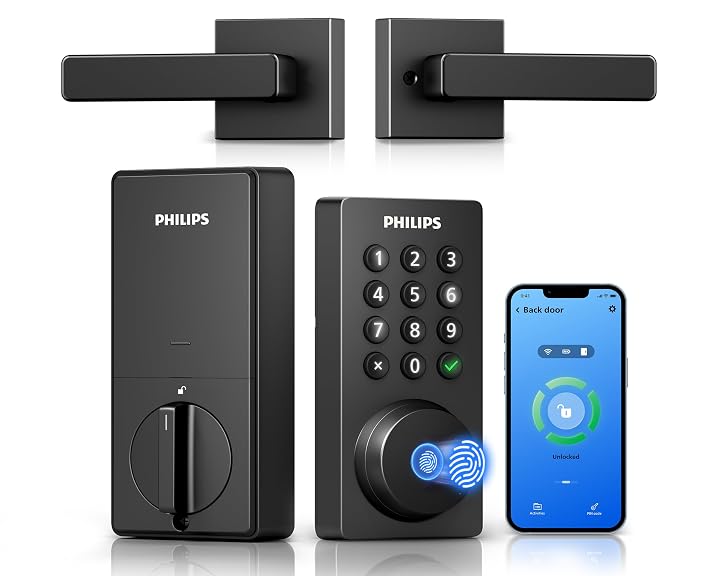
The Philips WiFi Keypad Deadbolt with Handle is the Philips 4200 Series, model DDL242X-1HW-L, and it is the most complete kit here for anyone starting from scratch. The box includes the smart lock, two door levers, a latch assembly, and mounting hardware, so you get a matched front door set without buying extra pieces.
Its headline feature is fingerprint access, with a claimed unlock time of 0.3 seconds and storage for multiple fingerprints; the listing does not specify the exact count. It supports permanent, one-time, periodic and recurring PIN codes, and the app shows lock status and access history in real time. The listing adds anti-drill protection and a back-lit keypad. Two notes from the listing are worth heeding: keep the lock within 33 feet of your router, and auto lock (0 to 180 seconds) is off by default, so turn it on during setup.
Battery life is listed as up to 6 months, batteries not included, with a recommendation to use standard 1.5V cells. The listing does not specify a weather rating, so if your door faces direct rain, the IP-rated models may be a safer bet.
- 0.3-second fingerprint unlock
- Handle set, levers and latch included
- Anti-drill and back-lit keypad
- Real-time access history in the app
No. 03
of 6
Philips
Philips WiFi Smart Keypad Deadbolt Lock
9.4
/10
Our score
Well rated
Scored 9.2/10 or higher
Affiliate link. Price and stock live at Amazon and change there, not on this page.
Best for
Keypad-only deadbolt swap
Pros
- Built-in WiFi, no hub
- Physical buttons
- IP54 weather rating
Cons
- 12-month warranty
- No fingerprint reader
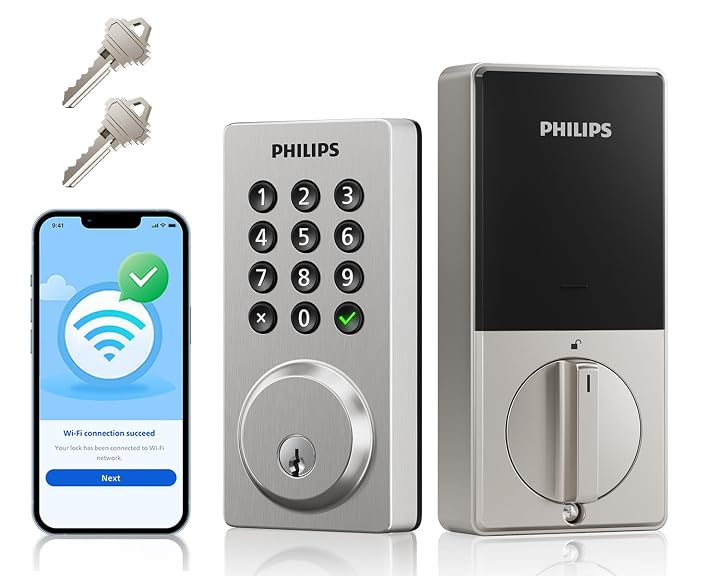
The Philips WiFi Smart Keypad Deadbolt Lock carries the same model number, DDL242X-15HW, as the Philips Smart Lock above, and its feature list is nearly identical: built-in WiFi with no hub needed, four unlock methods, physical buttons, up to 100 custom passwords, and auto lock from 10 to 180 seconds.
It also shares the 8 AA battery setup with a claimed 6-month life, the -31°F to 150°F operating range, 2200N pressure resistance and IP54 rating. The one meaningful difference in the listings is support: this one lists a 12-month warranty, while the Philips Smart Lock lists 24 months. The spec sheet here also spells out the lock type as deadbolt, keyless entry, keypad and WiFi smart lock.
This Philips keypad deadbolt suits someone swapping out a standard deadbolt and keeping their existing knob or lever. Given the warranty gap, compare both listings at checkout; if they are otherwise equal, the longer coverage on the Philips Smart Lock is worth having.
No. 04
of 6
Philips
Philips Wi-Fi Smart Lock for Front

8.0
/10
Our score
Affiliate link. Price and stock live at Amazon and change there, not on this page.
Best for
Fingerprint deadbolt keeping your existing handle
Pros
- Stores up to 50 fingerprints
- Five unlock methods
- Offline one-time passcodes
- Fits left or right-handed doors
Cons
- No handle included
- Weather rating not specified
The Philips Wi-Fi Smart Lock for Front door (model DDL-241-BK) is the Philips fingerprint deadbolt for people who want biometrics without replacing their handle. Its fingerprint sensor sits at the top of the panel with a 7.17-degree tilt, designed so you can reach and unlock in one motion, and it stores up to 50 fingerprints.
It lists five ways to unlock: fingerprint, PIN, the app, voice through Alexa and Google, and a physical key. The code system is the most detailed in this group, with 100 passcodes that can be permanent, recurring weekly, date-range, or offline one-time codes that expire automatically, which is ideal for rentals. Locking is flexible too: auto lock from 10 to 180 seconds, or press and hold any key for 2 seconds, tap the check button, or use your fingerprint. You also get unlock notifications and an activity log.
It fits left- and right-handed doors 1-3/8 to 2 inches thick and needs 8 AA alkaline batteries. The listing does not specify battery life or a weather rating. For a deeper look at this style of lock, see our guide to the Philips fingerprint keyless entry door lock.
- Up to 50 stored fingerprints
- Offline one-time and date-range passcodes
- One-touch locking options
- Includes exterior and interior assembly plus 2 keys
No. 05
of 6
Philips
Philips Upgraded Wi-Fi Smart Front Door

8.8
/10
Our score
Affiliate link. Price and stock live at Amazon and change there, not on this page.
Best for
Fingerprint lock plus matching handle
Pros
- 3s fingerprint unlock
- Handle and lever included
- Unlock alerts show which user
- IP53 waterproof
Cons
- IP53 lower than keypad models’ IP54
The Philips Upgraded Wi-Fi Smart Front Door lock set (model DDL242X-1HW-H-NEW) is the Philips smart lock with handle for buyers who want fingerprint speed and a finished look. In the box you get the smart lock, an exterior handle, an interior lever and 2 keys, and it is designed to replace both your existing deadbolt and knob.
The fingerprint sensor is listed at 0.3 seconds, and the five unlock methods match the fingerprint model above. Auto lock runs from 10 to 180 seconds, and the app sends a notification every time the door unlocks, showing which user did it, which is handy with kids coming home. You can create up to 100 time-sensitive codes that expire on schedule. It carries an IP53 waterproof rating, a touch below the IP54 keypad models.
Installation specs cover standard US doors with a cross bore of 1-1/2 or 2-1/8 inches and thickness of 1-3/8 to 2 inches, done with a screwdriver and the included video and manual. The listing does not specify battery life or fingerprint storage count. Our Philips smart door lock overview covers more of the range.
No. 06
of 6
Philips
Philips WiFi Keypad Door Lock

9.4
/10
Our score
Well rated
Scored 9.2/10 or higher
Affiliate link. Price and stock live at Amazon and change there, not on this page.
The Philips WiFi Keypad Door Lock (model DDL242X-15HW-L) takes the keypad-only DDL242X-15HW design and adds two lever handles. That makes it the handle-set choice for anyone who does not care about fingerprints and just wants reliable physical buttons and matching hardware.
Features mirror the other keypad models: built-in WiFi, four unlock methods, up to 100 passwords, auto lock from 10 to 180 seconds, IP54, -31°F to 150°F operation and 2200N pressure resistance. It lists compatibility with standard US deadbolt preps (1-1/2 or 2-1/8 inch cross bore, 1-3/8 to 2 inch doors) and installation in about 15 minutes, plus a 2-year warranty.
One inconsistency: the listing headline says 9 months of battery life, but the detail text beneath it says up to 6 months with 8 AA batteries. Plan around 6 months until Philips clarifies.
What Sets These Models Apart
| Model | Fingerprint | Handle included | Weather rating | Warranty listed |
|---|---|---|---|---|
| Philips Smart Lock | No | No | IP54 | 24 months |
| WiFi Keypad Deadbolt with Handle | Yes, 0.3s | Yes, 2 levers | Not specified | Not specified |
| WiFi Smart Keypad Deadbolt Lock | No | No | IP54 | 12 months |
| Wi-Fi Smart Lock for Front | Yes, up to 50 prints | No | Not specified | Not specified |
| Upgraded Wi-Fi Smart Front Door | Yes, 0.3s | Yes, handle and lever | IP53 | Not specified |
| WiFi Keypad Door Lock | No | Yes, 2 levers | IP54 | 2 years |
Figures in this table are copied from the Amazon listings for these models.
NOTES
Buying Tips for Philips Smart Deadbolts
Check your WiFi first. Every lock here connects to 2.4GHz only, and the 4200 Series listing asks you to keep the lock within 33 feet of the router. If your front door is a dead zone, fix coverage before blaming the lock. Also measure your door: the listings that give dimensions call for 1-3/8 to 2 inch thickness and a standard cross bore.
Decide on fingerprint versus keypad honestly. Fingerprint models shave seconds off every entry and help when your hands are full, while keypad-only models keep things simple with physical buttons. Then decide whether you want new handles; a deadbolt-only lock is cheaper to fit alongside hardware you already like.
Finally, budget for batteries. All listings that mention power use 8 AA cells not included, and alkaline 1.5V cells are specified on several. Turn on auto lock in the app during setup, since at least one model ships with it off.
FAQ
Do Philips smart deadbolts need a hub?
No. Each listing describes built-in WiFi that connects directly to a 2.4GHz home network, controlled through the Philips Home Access app.
Which Philips smart lock has a fingerprint reader?
The WiFi Keypad Deadbolt with Handle, the Wi-Fi Smart Lock for Front and the Upgraded Wi-Fi Smart Front Door all include fingerprint unlock. The other three are keypad models.
How does Philips smart lock auto lock work?
You set a timer in the app, from 10 to 180 seconds on most models and 0 to 180 seconds on the 4200 Series. After that delay, the deadbolt throws itself. The 4200 Series listing notes auto lock is off by default.
How long do the batteries last?
The keypad models claim up to 6 months on 8 AA batteries at 20 to 30 uses a day. The WiFi Keypad Door Lock listing says 9 months in its headline but 6 months in its details, and two fingerprint models do not specify battery life.
Do these locks work with Alexa and Google Assistant?
Yes, every listing mentions Alexa and Google Assistant support for voice control or status checks.
Can I give temporary codes to guests?
Yes. All models support multiple code types, including one-time and timed codes, with up to 100 codes on the models that state a number.
Related reading: hornbill smart lock deadbolt.


