Looking for a Kasa Smart Button? These Kasa Switches Do the Job
Every figure on this page is quoted from the Amazon listing for that model. Scores are the average rating Amazon buyers left. Nothing here was handled or measured by us.
As Amazon Associates, we earn from qualifying purchases. This means we may receive a small commission at no extra cost to you if you click through and make a purchase.
If you searched for a Kasa smart button, here is the straight answer: Kasa does not sell a standalone, battery-powered scene button in this lineup. What it does sell are plugs and wall switches with physical push buttons built in, and each one can also be triggered from the Kasa app, a schedule, or your voice through Alexa or Google Assistant. For a gamer who wants one tap to bring the room lights up after a session, or to kill the monitor backlight and speakers at bedtime, those buttons do the job a smart button would do, just from a fixed spot.
This article covers three Kasa devices that fill the role in different ways. The Kasa Smart Plug HS103P4 is a four-pack of plug-in outlets with an on-device button, ideal for lamps, LED strips on a wall adapter and other desk gear. The Kasa Smart Dimmer Switch HS220P3 replaces a standard single-pole wall switch and adds dimming. The Kasa Smart 3-Way Dimmer Switch Kit replaces a pair of 3-way switches, the kind you find at both ends of a hallway or stairway. We compared listings, specifications and intended use, not hands-on testing, so everything below comes from what Kasa states for each model.
JOB SHEET
Which Kasa Smart Button Alternative Should You Buy
- You rent, or you just want to control a lamp, fan or LED power supply without touching wiring: Kasa Smart Plug HS103P4.
go to no. 01 - You want a wall switch with one-tap on and a double-click fade-off for a single-switch game room: Kasa Smart Dimmer Switch HS220P3.
go to no. 02 - Your light is controlled from two locations, such as a stairway or a long hallway to your setup: Kasa Smart 3-Way Dimmer Switch Kit.
go to no. 03 - You want to control several separate devices on one schedule: Kasa Smart Plug HS103P4, since the pack includes four plugs.
go to no. 01
No. 01
of 3
Kasa Smart
Kasa Smart Plug HS103P4

4.7
out of 5
Amazon buyer average
Well rated
4.6 or better out of 5 on Amazon
Affiliate link. Price and stock live at Amazon and change there, not on this page.
Best for
Renters wanting plug-in control of desk gear
Pros
- No hub, 2.4GHz Wi-Fi only
- Four plugs in the pack
- Timers and countdown schedules
- Alexa and Google Assistant voice control
Cons
- No dimming
- Button sits on the plug, not your desk
The Kasa Smart Plug HS103P4 is the easiest way into Kasa smart home control. It is a Wi-Fi outlet that plugs into an existing wall socket, and whatever you plug into it can then be switched from the Kasa app, from a timer or countdown schedule, or by voice through Alexa or Google Assistant. The listing describes it as having a touch actuator, and the specifications list the switch type as a push button, so there is a physical button on the plug itself for local control. This is the closest thing in the lineup to a Kasa smart button for people who cannot or do not want to rewire anything.
For a gaming space, think of the uses: a floor lamp behind the monitor, a desk fan, a humidifier, or the power adapter for a strip of accent lighting. Set a countdown so the fan shuts off after a late session, or schedule the lamp to come on before you sit down. The listing notes it needs a 2.4GHz Wi-Fi connection and no hub, and it is rated for 15 amps at 120 volts with UL certification. The app is free and the listing states compatibility with Android 5.0 or higher and iOS 10.0 or higher.
Where does it give way to the other two models? It has no dimming, and the button lives on the plug, which often ends up behind a desk. If you want a button on the wall at the door, or you want to fade the ceiling light instead of just switching it, look at the dimmer switches below.
- Four-pack of plug-in smart outlets, white
- Timer and countdown scheduling in the Kasa app
- Voice control via Amazon Alexa or Google Assistant
- No hub required, 2.4GHz Wi-Fi setup through the app
No. 02
of 3
Kasa Smart
Kasa Smart Dimmer Switch HS220P3
4.7
out of 5
Amazon buyer average
Well rated
4.6 or better out of 5 on Amazon
Affiliate link. Price and stock live at Amazon and change there, not on this page.
Best for
Single-switch game rooms needing dimmable lights
Pros
- 0-100% dimming from the switch
- Double-click to fade off
- Voice and remote app control
Cons
- Needs a neutral wire
- Single-pole circuits only
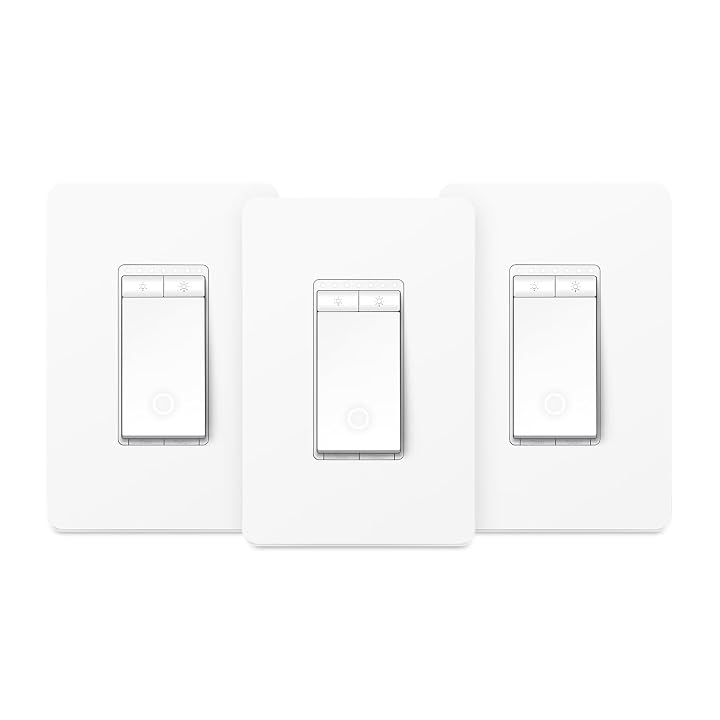
The Kasa Smart Dimmer Switch HS220P3 goes in the wall in place of a standard single-pole light switch. Its front is a push-button actuator with built-in up and down dimmer buttons, and the listing describes the behavior clearly: a single click brings the light on instantly, a double-click fades it off, and a quick tap toggles back to the previous brightness level. That double-click fade is exactly the kind of one-touch routine people want from a smart button, only it sits where your old switch was.
Dimming runs from 0% to 100%, adjustable on the switch or in the Kasa app, and you can set schedules so the room wakes you with a soft glow or dims automatically. Voice control through Alexa or Google Assistant is supported, and remote control works from anywhere through the app. It needs a neutral wire and 2.4GHz Wi-Fi, with no hub. The listing recommends consulting an electrician if you are unfamiliar with electrical wiring, which is sensible advice for any in-wall device.
This is the pick for a bedroom or game room with a single switch controlling the overhead light. If the same light is controlled from two switches, the HS220P3 is not the right fit, because its circuit type is listed as 1-way. The 3-way kit below covers that case. If you are still comparing wall options, our Kasa wall switch guide goes wider on the category.
- 0%-100% dimming from the switch or app
- Single-click on, double-click fade off
- Scheduling for wake-up and bedtime lighting
- Dimensions with panel 5.06 x 3.33 x 1.74 in.
No. 03
of 3
Kasa Smart
Kasa Smart 3-Way Dimmer Switch Kit

4.0
out of 5
Amazon buyer average
Affiliate link. Price and stock live at Amazon and change there, not on this page.
Best for
Stairways and halls with two switch locations
Pros
- Replaces 3-way switches
- 1-100% dimming with schedules
- ETL certified, 2-year warranty
Cons
- Needs neutral wire and wiring confidence
- Dimming does not support smart Wi-Fi bulbs
The Kasa Smart 3-Way Dimmer Switch Kit, listed as the KS230 KIT v2, replaces traditional 3-way switches, the setup where one light can be switched from two places. Living rooms, stairways and hallways are the examples the listing gives. If your setup lives in a basement or loft reached by stairs, this lets you bring the lights up from the bottom and shut them from the top, while still getting app and voice control.
Dimming covers 1% to 100% from the switch or the Kasa or Tapo app, and schedules can turn lights on or off at a chosen brightness for night lighting or gentle waking. The listing supports incandescent bulbs up to 300W or dimmable LED bulbs up to 150W, and it notes one important limit: the dimming function does not support smart Wi-Fi bulbs. So if your room already runs color smart bulbs, dimming them from this switch is not supported. It is ETL certified, carries a 2-year warranty, and supports firmware updates through the app.
Like the HS220P3, it needs a neutral wire and 2.4GHz Wi-Fi, and the listing recommends an electrician if you are not comfortable with wiring. It is the right choice only if you actually have a 3-way circuit. For a single switch location, the HS220P3 does the same core job with a simpler install.
- Replaces 3-way switches in halls and stairways
- 1%-100% dimming with brightness schedules
- Supports up to 300W incandescent or 150W dimmable LED
- Firmware updates through the app
What Sets These Models Apart
| Model | Install | Dimming | Circuit |
|---|---|---|---|
| Kasa Smart Plug HS103P4 | Plug-in, no wiring | No | 1-way outlet |
| Kasa Smart Dimmer Switch HS220P3 | In-wall, neutral wire required | 0%-100% | Single pole (1-way) |
| Kasa Smart 3-Way Dimmer Switch Kit | In-wall, neutral wire required | 1%-100% | 3-way |
Figures in this table are copied from the Amazon listings for these models.
NOTES
Buying Tips for Kasa Smart Buttons and Switches
Start with what you want to control. If it plugs into a wall socket, such as a lamp, a fan or an LED strip power brick, a smart plug is the simplest answer and requires no tools. If it is a ceiling light on a wall switch, you need an in-wall switch, and then the question is whether that light is controlled from one location or two. Open your switch box or check how many switches control the light before ordering, because a single-pole dimmer and a 3-way kit are not interchangeable.
Check your wiring and network before you commit. Both wall switches here need a neutral wire, and all three devices need 2.4GHz Wi-Fi. Many mesh and gaming routers broadcast a combined band, so make sure a 2.4GHz network is available during setup. If you prefer newer standards, our coverage of the Kasa Matter smart plug is worth reading, since the HS103P4 listing mentions Alexa and Google Assistant but does not mention Matter.
Finally, think about bulbs. The 3-way kit states that dimming does not work with smart Wi-Fi bulbs, and dimmer switches generally need dimmable bulbs. If your game room uses regular dimmable LEDs, a Kasa dimmer switch gives you app, voice and wall-button control at once. If it uses color smart bulbs, a plug on a lamp may be the cleaner route.
FAQ
Does Kasa make a dedicated smart button?
Among these three products, no. Each one has a physical push button on the device itself, and each can be controlled from the Kasa app, schedules and voice assistants, which covers most of what people want from a smart button.
Do these Kasa devices need a hub?
No. All three listings say they connect over 2.4GHz Wi-Fi without a separate hub.
Which Kasa device works with Alexa and Google Home?
All three list voice control through Amazon Alexa and Google Assistant.
Can I install the HS220P3 without a neutral wire?
No. The listing states it needs a neutral wire, and the same applies to the 3-way kit. The listing recommends consulting an electrician if you are unfamiliar with wiring.
Can the 3-way kit dim my smart color bulbs?
The listing says the dimming function does not support smart Wi-Fi bulbs. It supports incandescent bulbs up to 300W or dimmable LED bulbs up to 150W.
How many plugs come in the HS103P4 pack?
The listing title describes it as a 4-pack in white.